


upstream timed out (110: Connection timed out) while reading response header from upstream

提问于2020-06-16 11:37

浏览 5.7k
1、操作系统版本:CentOS Linux release 7.6.1810 (Core)
2、软件版本:nginx-1.18.0稳定版本
3、部署架构:nginx(反向代理)+后端(windows系统+tomcat)
4、问题描述:通过域名访问后端tomcat部署的网站时,同一个目录下面的部分.js文件加载不了



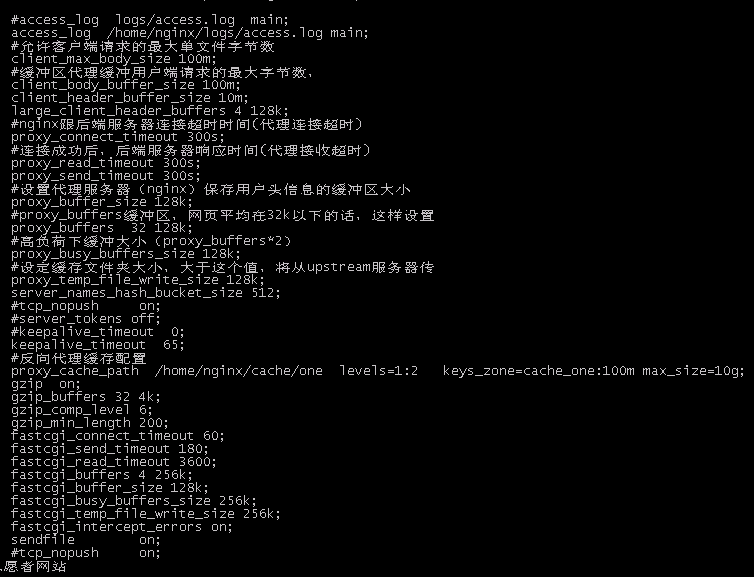
5、目前已经做了如下相关排错措施:
a、关闭nginx系统防火墙、关闭后端系统防火墙
b、nginx到后端tomcat网站端口没有问题
c、如果把无法加载成功的js文件用代码美化工具美化后,就可以加载。
6、请问还有其他故障诊断方法吗?或者诊断措施?
已修改于2023-03-16 02:12

写下您的回答
全部回答(1)
按点赞数排序
按时间排序

如果是三次握手没有成功,需要在nginx及上游,分别用tcpdump/wireshark抓包看下,是SYN还是ACK报文丢失了,是在哪个节点丢失的,再来分析为何会丢失,又该如何恢复。
wireshark抓包参见我讲的这一课:https://time.geekbang.org/course/detail/100026801-100973
tcpdump抓包参见这里:https://time.geekbang.org/course/detail/100026801-118169
 赞同
赞同2
回复 举报
举报回答于2020-06-17 10:37


相关问答
这个问题已经的到解决,需要在nginx controller的service 中配置environment, gateway, api, certs等相关参数,即可得到解决
 点赞 0
点赞 0 浏览 3.8k点赞 0浏览 4.5k
保持联系
 微信公众号
微信公众号 加入微信群
加入微信群


开放 · 包容 · 沟通 · 贡献
Copyright © F5, Inc. All Rights Reserved. F5 版权所有
